How to Automate Email Responses: A Guide for Financial Advisory Firms

Bhavya Barot
No advisory firm should be spending hours every week manually drafting, reviewing, and sending the same types of emails to prospects.
An AI-automated email system eliminates that busywork. And done right, it doesn't sacrifice personalization — it actually improves it, because AI can pull in real-time data on each prospect that a human writing from scratch simply wouldn't have time to research.
Inbox Chaos Is a Revenue Problem
Handling all email responses manually leads to delayed replies, missed prospects, and rushed messages that damage trust. When volume outpaces your team's capacity, both speed and quality suffer.
Manual Replies Kill Speed
Advisors waste significant time writing and sending response emails one by one. And even if the message is strong, it can fail if it arrives too late. By the time a reply lands in the prospect's inbox, there's every chance the moment has passed — they've moved on to another advisor or simply cooled off.
To make it worse, reps handling manual replies often forget to update CRM records after sending. Outdated or incomplete data then undermines your automated campaigns, since they rely on clean, accurate information about each prospect.
Generic Automation Kills Trust
Impersonal automated responses are worse than slow manual ones. Template-based replies feel robotic and erode trust with HNW prospects who have high expectations for every interaction.
Research from McKinsey shows that 71% of customers expect personalized interactions from the businesses they engage with. For wealth management, that expectation is even higher. HNW prospects can tell instantly when a message wasn't written for them specifically.
Automated replies should reference the prior conversation directly and be relevant to the prospect's financial situation, professional context, and specific questions. Poorly configured automation simply can't do this — but AI-powered automation can.
7 Email Automation Use Cases That Drive AUM Growth
There are many situations in advisory business development where automated email responses outperform manual alternatives. Implementing them for the right use cases frees advisors to focus on discovery calls and relationship-building.
1. Out of Office Without Losing Warm Prospects
A week away from the inbox doesn't have to mean lost prospects or stalled conversations.
Set up automatic out-of-office replies in your email client to manage expectations and prevent warm leads from growing impatient. In Gmail, this is called Vacation Responder. In Outlook, it's Automatic Replies.
The key is specificity: state exactly when you'll be back and confirm you'll respond to all messages as soon as possible. Optionally, include a backup contact or a direct booking link so high-intent prospects can still move forward.
2. Form Submissions That Trigger Immediate Action
If a prospect fills out a form on your website — whether to download a guide, request a consultation, or register for a webinar — respond instantly. They're engaged right now, and timing matters enormously.
Most marketing and web form platforms let you create autoresponder emails that trigger automatically on submission.
A strong automated form response should:
- Confirm receipt of the submission
- Thank the prospect for taking action
- Deliver exactly what they requested, with a clear link or button
- Optionally, include a calendar booking link if they requested a consultation
3. Discovery Call Confirmations and Pre-Meeting Prep
When a prospect books a discovery call, send a confirmation immediately.
Most scheduling tools (Calendly, Acuity, HubSpot Meetings) allow you to create automated confirmation emails triggered when a booking is made.
Your confirmation email should:
- Confirm the booking with date, time, and timezone
- Include the video call link or meeting address
- Outline what to expect from the conversation
- Optionally, ask 1–2 qualifying questions via a short form to help the advisor prepare
This simple automation boosts meeting attendance and sets a professional tone before the conversation even starts.
4. Content and Resource Delivery
If your firm offers downloadable content — a market outlook, a retirement planning guide, a fee transparency explainer — you need a reliable, automatic way to deliver those assets to prospects who request them.
The most common method is a web form that requires an email address for access. With marketing automation software, you create an autoresponder that triggers on submission, instantly delivering the asset via a link in the email.
This keeps your pipeline warm even when no human is actively following up.
5. Objection Handling in Outbound Sequences
AI sales agents — sometimes called AI BDRs — send personalized outreach emails on behalf of your firm and handle responses autonomously.
When a prospect replies with an objection ("I'm already working with someone," "Not the right time," "Send me more information"), the AI agent can identify the concern and respond with a relevant, context-aware reply that factors in the prospect's job title, prior engagement, and buying stage.
This is how firms scale outbound without hiring more business development staff. Valora, Spaces' autonomous AI BDR, runs this entire process — sending personalized sequences, handling objections, and notifying advisors only when a prospect is ready to book.
6. Re-Engagement After Silence
Prospects go quiet for many reasons that have nothing to do with lack of interest — life events, busy seasons, competing priorities. Setting up automated re-engagement emails that target prospects who've stalled is one of the fastest ways to unlock pipeline that already exists in your CRM.
Using trigger-based automation, you can fire re-engagement campaigns when a prospect hasn't opened an email in 30 days, hasn't progressed in a pipeline stage, or hasn't responded after an initial positive signal.
Spaces' Valora handles this automatically, using enriched prospect data to re-engage dormant contacts with messages that feel personal — not like a mass follow-up sequence.
7. Referral Follow-Up Acknowledgments
When a referral comes in through a partner advisor, accountant, or attorney, respond immediately with a warm, personalized email.
Automated referral acknowledgments do three things: they reassure the referral source that you acted quickly, they set a professional tone with the new prospect, and they start a structured follow-up workflow automatically.
How to Set Up Automated Email Responses in Practice
Gmail and Outlook Rules
Both Gmail and Outlook allow you to create filter-based rules that automatically reply to, categorize, or forward specific types of emails. These are best for simple use cases like out-of-office replies or routing specific inquiry types to the right team member.
Marketing Automation Platforms
Platforms like HubSpot, ActiveCampaign, and Mailchimp give you full control over trigger-based email workflows. You define the trigger (form submission, page visit, click event), and the platform sends the right email at the right time.
These platforms are the right choice for nurture sequences, content delivery, webinar follow-ups, and re-engagement campaigns.
AI-Powered Outreach Agents
The most advanced form of email automation is an AI agent that handles the full outbound workflow — prospecting, outreach, response handling, objection management, and CRM updating — without manual input.
Spaces' Valora operates at this level. She identifies prospects, crafts personalized messages, handles replies, and books meetings, notifying advisors only when human involvement is needed.
Best Practices for Email Automation That Doesn't Feel Like a Bot
Set Tight Triggers
Only fire automations under specific, defined conditions. Avoid replying to newsletters, CC threads, and irrelevant inbound traffic. Indiscriminate automated replies hurt your sender reputation and risk getting your domain flagged as spam.
Use filters like sender domain, subject line keywords, and engagement context to define exactly what warrants an automated reply.
Personalize Beyond the First Name
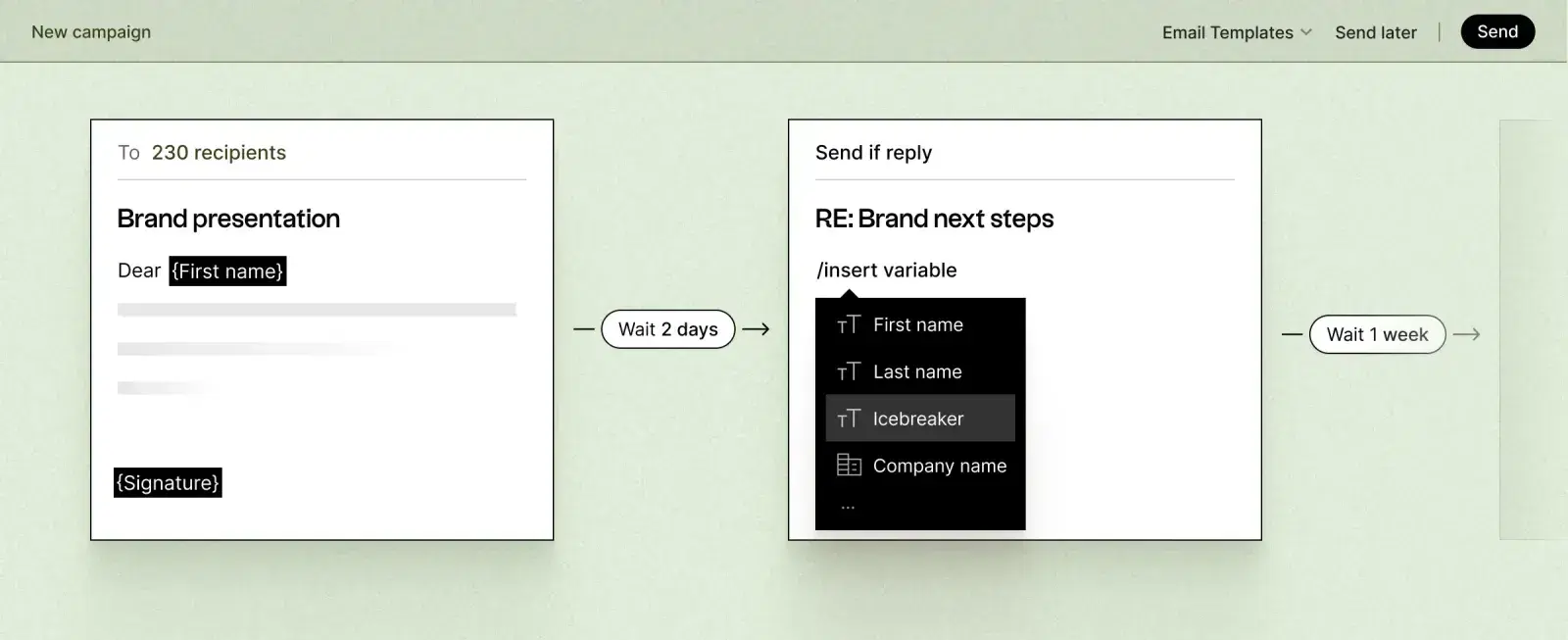
Go further than `{{first_name}}` tokens. Reference the prospect's firm, role, recent financial event, or prior engagement. That level of specificity increases relevance and builds trust.
To do this, your automation tools need access to enriched prospect data. Spaces continuously enriches prospect profiles across firmographic, behavioral, and intent signals — so every automated message is grounded in real, current information.
Protect Deliverability
If email deliverability drops, fewer of your automated messages reach prospects' primary inboxes.
The biggest threat to deliverability is over-automation — replying to everything indiscriminately, or sending high volumes from a cold domain.
Best practices include:
- Authenticate your sending domain with SPF, DKIM, and DMARC
- Warm up new domains gradually, starting at 50–100 emails per day
- Monitor bounce rates and spam complaint rates weekly
- Use email health tools like Warmy or MxToolbox to diagnose issues
Spaces includes built-in deliverability monitoring and warmup infrastructure — these protections run in the background without manual configuration.
Always Include a Clear Next Step
Every automated email should tell the recipient what to do next. A call-to-action button, booking link, or resource download prevents dead-end conversations and keeps prospects progressing.
Make the CTA visually clear — surrounded by white space, bolded or highlighted, easy to find on mobile. HNW prospects often read email on their phones. If the next step is buried, they'll miss it.
Automate Email Responses Like a Growth-Oriented Firm, Not a Helpdesk
Done right, automated email responses don't just keep prospects informed — they move them through the pipeline. They create immediate impressions of professionalism, responsiveness, and personalization.
With AI-powered outreach like Valora, you can trigger automated emails that sound like they came from a thoughtful advisor, fire at exactly the right moment, and adapt to each prospect's specific situation and needs — all without a human writing a single word.